
Distance-Driven Robot with Tilt Detection
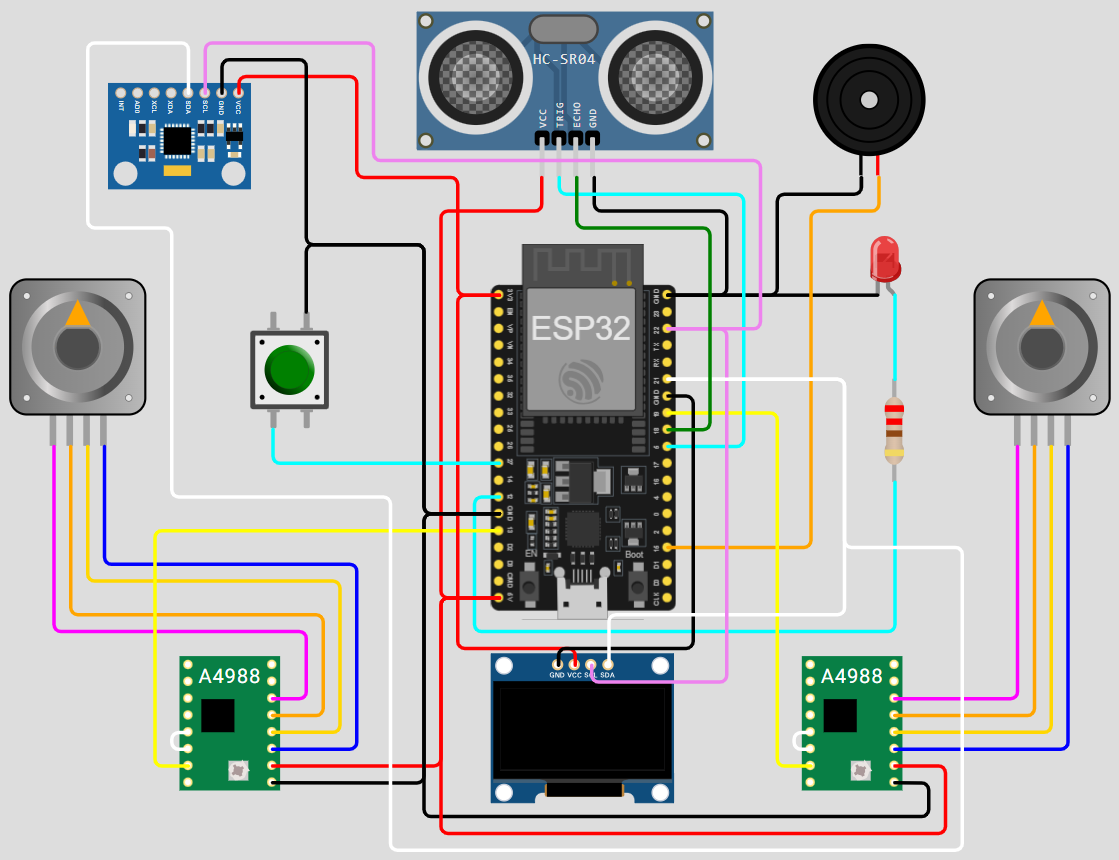
This project controls a small two-wheel robot that travels toward a target based on an ultrasonic distance measurement. The robot waits for the user to press a button, calculates the required number of motor steps, drives both stepper motors, and continuously checks its accelerometer for unsafe tilt.
The OLED screen, LED, and buzzer provide clear status feedback throughout the process.
Features
- Button-controlled start
- Ultrasonic distance measurement
- Automatic distance-to-step conversion
- Synchronized left and right stepper-motor movement
- Continuous Y-axis tilt monitoring
- OLED status and result messages
- Audible success and warning signals
- LED warning when the robot tilts
- Repeating operation for multiple runs
Hardware
The program expects the hardware objects configured in main.py:
- LED
- Push button
- Buzzer
- Two stepper motors (left and right)
- Ultrasonic distance sensor
- OLED display
- Accelerometer
Refer to the object initialization section at the top of main.py for the GPIO pins, I²C addresses, and other board-specific configuration used by your build.
Safety: Place the robot on a clear, level surface before pressing the button. Be ready to lift or power off the robot if it approaches an obstacle or edge.
How it works
The main control loop runs continuously:
- The warning LED is turned off.
- The OLED is cleared and displays Press button to start.
wait_button_press()blocks execution until the user presses the button.- The buzzer beeps once to confirm the start.
- The ultrasonic sensor measures the distance to the target.
get_steps_from_distance(distance)converts that measurement into a motor-step count.- The OLED displays the measured distance and calculated steps.
- A
reachedflag is initialized toTrue. - The program repeats once for every calculated step:
- Move the right motor one step.
- Move the left motor one step.
- Read the accelerometer's Y-axis value (
AcY). - If the tilt threshold is exceeded, set
reachedtoFalseand stop driving.
- The robot reports the result:
- REACHED: Display the message and beep once.
- TILTED: Turn on the LED, display the warning, and beep three times with short pauses.
- The final message remains visible for 2–3 seconds before the loop resets.
Program flow
Idle / LED off
      |
Display "Press button to start"
      |
Wait for button press
      |
Beep and measure distance
      |
Convert distance to motor steps
      |
Move both motors one step at a time
      |
Check AcY after every step
      |
  +---+------------------+
  |                      |
Tilt detected        All steps completed
  |                      |
Stop movement        Display "REACHED"
LED on               Beep once
Display "TILTED"
Beep three times
  |                      |
  +----------+-----------+
             |
      Pause, then reset
Tilt detection
After every pair of motor movements, the program reads AcY. A reading outside the permitted range indicates that the robot has tilted and may no longer be driving safely.
The intended check is equivalent to:
if AcY > 12000 or AcY < -12000:
    reached = False
    break
This detects a magnitude greater than 12000 in either direction. A condition such as AcY > 12000 or AcY > -12000 is not equivalent and would be true for most normal readings.
The threshold is a test value and may require calibration for the specific accelerometer orientation and chassis.
Status indicators
| State | OLED | LED | Buzzer |
|---|---|---|---|
| Waiting | Press button to start |
Off | Silent |
| Starting | Distance and step count | Off | One beep |
| Target reached | REACHED |
Off | One beep |
| Excessive tilt | TILTED |
On | Three beeps |